Momscode - Keltech
Item Master:
- Automatic Item Code generation based on Category,Subcategory and Product Serial Number
- Created Doctypes – Category , Subcategory
- Category - For creating categories used for automatic Item code generation.
- Subcategory - For creating subcategory under category used for automatic item code generation.
- Product Serial Number- The start value of product serial number can be set in Custom Settings in Item Code G Generation Tab.

Estimation
- Created Doctypes- Quote Request, Per Hour Cost Calculation, Estimate BOM, Subcontracting Activity, Equipment.
- Quote Request- Service items used in Project are listed in Quote Request.On saving Quote Request Service items listed in QR are created as items in Item Master.The Service code series and Item Group for Service item can be set in Custom Settings.

- Per Hour Cost Calculation- This Doctype is used to calculate Per Hour Cost based on Designation.The calculated cost is used in Estimate BOM when a particular Designation is selected.The Designations considered for Overtime/Holiday OT need to be set in Custom Settings.Only these designations are considered for overtime/Holiday OT calculation.

- Subcontracting Activity- This Doctype is used to create Subcontracting Activity used in Estimate BOM.
- Equipment Details- This Doctype is used to create the Equipments used in Estimate BOM.
Estimate BOM This Doctype is used for Estimation process.It has the following tabs.
- Details - When clicks on Create Estimate BOM button from QR fetch the respective details automatically to this tab.
- Summary - Some manual entries like Overhead cost ,PMT cost,Net Profit,Other Charges are entered here.The total cost of other tabs are displayed in this section.Here the estimated value for the service item is calculated and displayed in Grand Total field.
- Equipment – Total Equipment cost is calculated.
- Subcontracts – Total Subcontracts cost is calculated.
- Materials & Tools – Total Materials & Tools cost is calculated. Materials & Tools field is filtered based on the Item group listed in Custom Settings.

Project Customization
- Project customizations are done to accomodate the Estimated Values to Project
- Create Button - If a single cost center structure is followed then use this button to create cost center for this project.Cost center will be created in the same name of project and it will set automatically as the default cost center of the project in the Costing and Billing section.This should be created as soon as the project is created.
- The following tabs are used in Project.
- Estimated Cost Details- While submitting sales order - fetch the values of all the section with the relevant information from estimate BOM- with reference to Service name(sales order -> Quotation-> Quote Request -> Estimate BOM).Task and Activity Type are auto created with reference to the Service Name in the related Estimate BOM.Both Task and Activity Type are created in the same name of Service Name.
- Execution Details – On submitting Timesheet,the Estimated hours and total Executed hours the accumulation of total hours from timesheet based on Service Name and Designation are calculated and displayed in Execution details table.
- In Purchase Order a checkbox named Subcontracts is created to enable the Subcontractor.When a PO against Subcontractor is placed through Project,the total PO value is compared with the estimated total cost of subcontracts. if the PO amount against Subcontractor is greater than the Estimated value it will show a warning message but it will not block the further proceedings.
- When a Material Request is placed through project the total quantity of MR is compared with the total Estimated quantity of material.Item groups considered for Material Request need to set in Custom Settings.Items in MR is filtered based on the item groups set in Custom Settings.If the quantity in MR is higher than the Esimated quantity then a warning message will be displayed.but it will not block the further proceedings.
- When a timesheet is submitted against a task in Project the total Executed hours is compared with the Estimated hours.


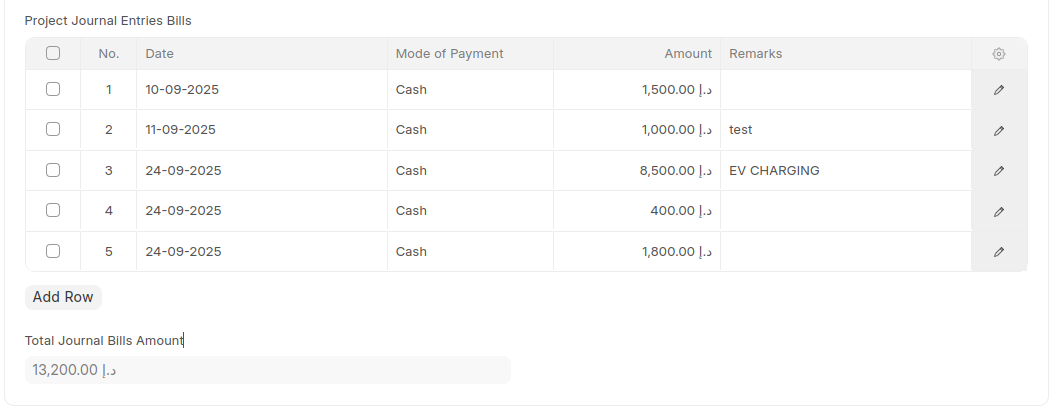
When a journal entry is submitted with a project linked in it, the details — such as date, party, amount, mode of payment, and remarks — are automatically populated in the Project Journal Entries Bills child table of the corresponding Project document.The total amount from the table is then displayed in the Total Journal Bills Amount field.
Overtime Customization
- Pre-requisites:Working Day Overtime Factor,Holiday Overtime Factor,Normal Working Day Overtime Salary Component,Holiday Overtime Salary Component should be set in Custom Settings.
- Created Doctypes: OT Calculator
- Attendance Request- Added In Time and Out Time field.Based on the shift selected OT Hours is calculated.For holidays total hours is considered as OT.
- OT Calculator – After selecting salary component and payroll date click on Fetch Employee Details button, then based on the attendance request within the start and end date calculate the total OT hour for that employee for the selected salary component(overtime/holiday overtime).To calculate hourly rate base value from the Salary Structure is considered.So employee should have a Salary Struture.Holiday List should be assigned to employee.based on the holiday list OT is calculated.Employee details are displayed only if the OT value is greater than zero.On submitting OT Calculator, Additional Salary is created and submitted.In the salary slip the details such as OT Hours,Hourly Rate for the additional salary component is displayed.
- Pre-requisites-Employee should have a Holiday List,Salary Structure Assignment(To fetch base value from latest assignment based on payroll period)

Custom Settings
- Single doctype to set values.
- Quote Request Item Group - Item group for item created using Quote Request.
- Materials Tools Item Group - The Items in materials & tools section of the Estimation will be filtered based on the Item groups set in this section.
- Per Hour Cost Calculation- Overtime/Holiday OT - Designations set in this will be considered for Overtime/Holiday OT calculation in Per Hour Cost calculation.
- Service Code Series - Series for the Service items created using Quote Request.
- Product Serial Number - The start value of Product serial number used for automatic item code generation.
- Item Group for Material Request - The material request created through Project will consider Items with item group set in this view.Items are filtered based on this Item group.
- Working Day Overtime Factor - This value is used for overtime calculation in OT Calculator.
- Holiday Overtime Factor - This value is used for Holiday OT calculation in OT Calculator.
- Normal Working Day Overtime Salary Component - Salary component considered for Normal working day overtime.
- Holiday Overtime Salary Component - Salary component considered for Holiday Overtime.
- Parent Cost Center - Parent cost center required for auto creation of cost center in project.

* Additional Reports for Project Monitoring*
- Project-wise Supervision and Labour Summary
- Project-wise Summary of Subcontracted work
- Project-wise Inventory and Tools Usage Summary
Attendance Request Customization
Attendance Request is customized to include the Project details.Project name,Taskname and hours will be enterd and based on this Timesheet will be automatically created.
Hourly Salary Calculator
- Hourly Salary Calculator is used to calculate the hourly based amount for each employee in a given payroll period against a selected salary component.Hourly Salary Calculator need to be created and submitted for each payroll period against each salary component.Against each component the amount will be calculated based on the hourly rate and no.of working hours for each employee.an additional salary will be created based on this.This additional salary will be used for payroll processing.
Payroll Processing
- Salary Component:Salary components will be created using this document.
- Salary Structure:Salary Structure will be created using this document.
- Salary Structure Assignment:For each employee a salary structure will be assigned.
- Payroll Entry:A Payroll Entry will be created for the payroll period.salary slip will be created based on this.
Leave Management
- Leave Type: Different types of leave types can be created using this document.
- Leave Period: Leave Period is a duration for which leaves are allocated.
- Leave Policy: The amount of entitled leaves in a Company for an Employee in a Leave Period is known as Leave Policy.
- Leave Policy Assignment: Leave Policy Assignment is used to assign leaves to employees based on created policies
- Leave Allocation: Leave Allocation used to allocate a specific number of leaves of a particular type to an Employee